
Screen Time Management for Students: A Parent’s Step-by-Step Guide
A comprehensive guide for parents to manage their children's screen time effectively.
This blog explores effective strategies for parents to manage their children's screen time, ensuring a balanced approach to digital learning and healthy habits.
Listen to this article
Screen Time Management for Students: A Parent’s Step-by-Step Guide
In today's digital age, screen time has become an integral part of our daily lives, especially for students. With the rise of online learning platforms, educational apps, and digital resources, managing screen time is crucial for maintaining a healthy balance between academic responsibilities and personal well-being. This blog aims to provide parents with a step-by-step guide to effectively manage their children's screen time, ensuring that technology serves as a tool for learning rather than a source of distraction.
Why Screen Time Management Matters
Screen time management is essential for several reasons. First and foremost, excessive screen time can lead to various health issues, including eye strain, poor posture, and sleep disturbances. According to the American Academy of Pediatrics, children aged 6 to 18 should have consistent limits on the time spent using screens to promote a healthy lifestyle.
Moreover, managing screen time helps students focus on their studies and engage in offline activities that foster creativity and social skills. With the increasing reliance on technology for education, it is vital for parents to guide their children in developing healthy technology habits. By implementing effective screen time management strategies, parents can help their children become more productive and responsible digital citizens.
Identifying Productive vs Unproductive Screen Use
The first step in managing screen time is to differentiate between productive and unproductive screen use. Productive screen time includes activities that contribute to learning and skill development, such as:
Participating in online classes or webinars
Using educational apps and resources for homework and projects
Engaging in virtual study groups or discussions
On the other hand, unproductive screen time often involves activities that do not contribute to personal growth or academic success, such as:
Scrolling through social media
Playing video games excessively
Watching non-educational content on streaming platforms
To help students identify productive screen time, parents can encourage them to set specific goals for their online activities. For example, if a student is using an educational app to prepare for their CBSE exams, they can set a goal to complete a certain number of practice questions each day. This approach not only helps students stay focused but also instills a sense of accomplishment as they track their progress.
Setting Daily Screen Limits for Students
Establishing daily screen limits is a crucial aspect of effective screen time management. Parents should consider the following factors when setting limits:
Age of the child: Younger children may require stricter limits compared to teenagers.
Type of screen use: Differentiate between educational and recreational screen time.
Overall daily schedule: Consider the child's school hours, homework, and extracurricular activities.
A practical approach is to create a daily screen time schedule that allocates specific time slots for productive screen use, such as online classes and homework, as well as recreational activities. For instance, a student in Class 10 preparing for board exams might have a schedule like this:
Online classes: 8:00 AM - 2:00 PM
Homework and study time: 3:00 PM - 5:00 PM
Recreational screen time: 5:30 PM - 7:00 PM
Family time (device-free): 7:00 PM - 8:00 PM
By setting clear limits and adhering to a schedule, parents can help their children develop a balanced approach to screen time that prioritizes academic responsibilities while still allowing for leisure activities.
Creating Device-Free Study and Meal Zones
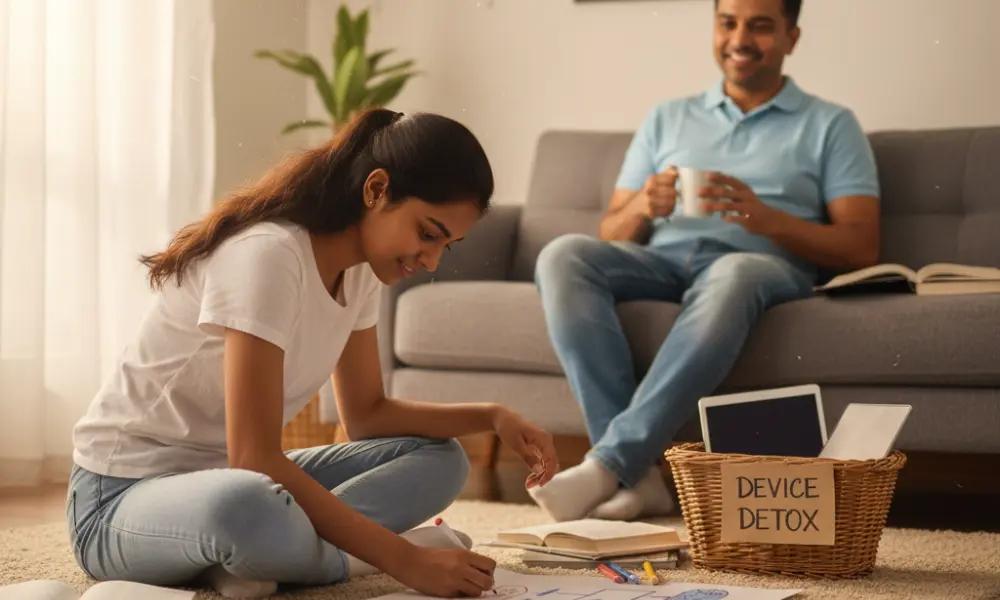
Creating designated device-free zones in the home can significantly enhance focus and promote healthy family interactions. Parents can establish specific areas where screens are not allowed, such as:
Study areas: Designate a quiet space for studying that is free from distractions.
Dining areas: Encourage family meals without devices to foster communication and bonding.
For example, parents can set up a study corner in their child's room or a common area where they can concentrate on their work without the temptation of their devices. During meals, parents can encourage everyone to put their phones away and engage in meaningful conversations. This practice not only helps students focus better on their studies but also strengthens family relationships.
Recommended Screen Breaks and Eye Care Tips
Taking regular screen breaks is essential for maintaining eye health and preventing fatigue. The 20-20-20 rule is a simple guideline that can help students take effective breaks: every 20 minutes of screen time, look at something 20 feet away for at least 20 seconds. This practice helps reduce eye strain and promotes better focus.
In addition to the 20-20-20 rule, parents can encourage their children to incorporate the following eye care tips into their daily routine:
Adjust screen brightness to match the surrounding light.
Maintain a proper distance from the screen (at least an arm's length).
Use blue light filters or glasses to reduce exposure to harmful blue light.
By promoting these habits, parents can help their children maintain healthy eyes and improve their overall well-being while using screens for educational purposes.
Using Parental Control Tools Wisely
Parental control tools can be valuable resources for managing screen time and ensuring that children engage in safe online activities. These tools allow parents to monitor their children's screen usage, set time limits, and restrict access to inappropriate content. Some popular parental control options include:
Built-in features on devices (e.g., Screen Time on iOS, Family Link on Android)
Third-party apps (e.g., Qustodio, Norton Family)
While these tools can be effective, it is essential for parents to use them wisely. Instead of solely relying on technology to enforce limits, parents should engage in open conversations with their children about the importance of responsible screen use. This collaborative approach fosters trust and encourages children to take ownership of their screen time habits.
Encouraging Offline Hobbies
Encouraging children to pursue offline hobbies is an excellent way to reduce screen time and promote a well-rounded lifestyle. Parents can help their children explore various activities that do not involve screens, such as:
Sports and physical activities (e.g., cricket, swimming, dancing)
Arts and crafts (e.g., painting, drawing, DIY projects)
Reading books or engaging in storytelling
By introducing children to diverse offline hobbies, parents can help them develop new skills, build friendships, and foster creativity. For instance, if a student enjoys painting, parents can encourage them to set aside time each week to work on their art projects. This not only provides a break from screens but also enhances their overall well-being.
Final Message: Digital Discipline Starts Early
In conclusion, managing screen time is a vital aspect of parenting in the digital age. By implementing effective strategies, such as setting daily limits, creating device-free zones, and encouraging offline hobbies, parents can help their children develop healthy technology habits. It is essential to remember that digital discipline starts early, and by instilling these practices, parents can set their children up for success in both their academic and personal lives.
As technology continues to evolve, the importance of screen time management will only grow. By taking proactive steps today, parents can ensure that their children navigate the digital landscape responsibly and thrive in their educational journey.
Suggested blogs
Your Child Got Into a Good CBSE School. Here's What Still Needs to Happen at Home.
Even the best CBSE school can't close every student's learning gaps inside a classroom of thirty-five. Here's what at-home support needs to look like.

Helping CBSE Class 10 Children Adjust to Post-Exam Uncertainty
Navigating the emotional landscape after exams with confidence and support

How Parents Can Help Children Decompress After CBSE Class 10 Boards
Supporting your child’s recovery after the CBSE Class 10 Boards
How Parents Should Talk to Children After Each CBSE Class 10 Exam
Supportive conversations for post-exam success